Posts

travel washington

Image
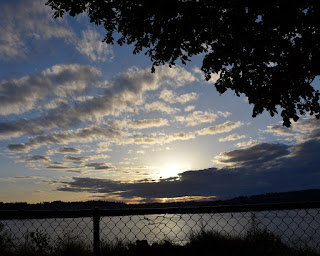
This was taken on the trail by Owens beach. I took the picture right when the sun was setting while incorporating the tree as a little border around on the top right corner making it look like a postcard type in my opinion. I then cropped the picture in Photoshop and changed the red, blue , and green levels individually to really get the skies color to pop out. The light in the middle really catches the attention to my eye which is why its one of my many favorite pictures of Washington. 

travel washington

Image
This was also taken in Tacoma but I went further on onto the boardwalk and waited for the sunset little before I got to the level with the railing and took the picture.I then cropped it and changed the levels in Photoshop to make the sunset more prominent.

travel washington

Image
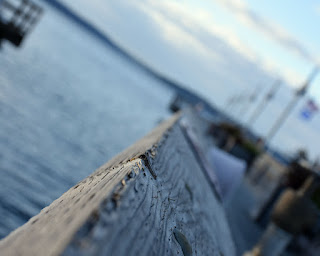
 This picture was taken at the waterfront in Tacoma and I tried different angles when it came to take the picture and changed the settings on the camera to get the right depth of field .afterward taking a few pictures I finally got my favorite picture and changed the levels o get the final product.

Panoramic and Portraits

Image
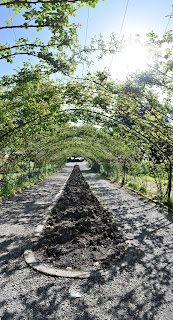
This picture was taken on a school trip I took with my photo class around the flower beds . I stood on one position and took many photos of the same place while moving the camera vertically. Afterwards I went onto Photoshop and merged around 30 photos together to get the panoramic effect and cropped it to get it to the right adjustment.  This was also taken in the same location but different place and what I did was use a mini tripod to get the perfect merge later on. I also then after taking a few I downloaded the photos to Photoshop and merged about the same amount of photos. then I cropped the photo to get I the right ratio when I printed it .This is my favorite photo out of all the ones I did. My last picture that I took was in the studio in my photo class I used the blue backround to really contrast his skin color and the way his eye color pops out in the photo mainly. Also I used two lights on his left side while the other on his right but behind his head to crea...

Photo Journalism 3

Image
For this picture I went to event at three to take pictures of an art event that was occurring at the time. I focused one the event most of the part but then I saw the cookies were a main snack that was being eaten so I capture that. I changed my aperture and shutter speed on manual mode o get  the perfect lighting and depth of field for the picture to have. I then photo shopped it a little with the levels and cropping the right way t o get the picture to come out like that. This picture was taken also at the same event but I focused more on the money that was being collected for donation and the raffle tickets during the event. For this I squatted a little to get at eye level with the table and my aperture was at the same it was last time but focusing more on the white paper then the red. I then used Photoshop to change the levels ,to crop, and fro the picture to be clear for the outcome.

Dutch Angle

Image
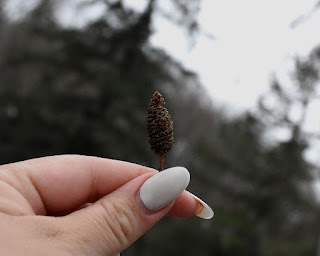
This picture was taken around a park that I go to frequently. How I got the picture is a changed the aperture so the little pinecone was focused and my hand. I then grabbed the camera and changed it a angle while holding the pinecone in the other hand and positioning. To finalize the picture I went into to Photoshop cropped the photo, change the blurredness of  the background even more. overall this picture is one of my favorites.

CPP

Image
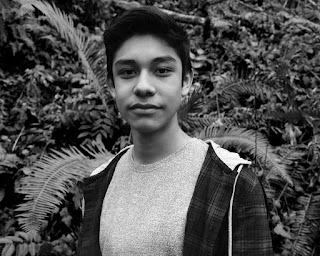
in my photo class we were assigned to do a research project on any famous photographers from the past and recreate their style of pitures.my photographer that I chose was Emmet Gowin and his types of photo were landscapes and portraits all in black and white mostly. I took this picture in a park close to my house and recreated a picture that's similar to this one I took but a woman instead.its all about recreating the style. I then ad him pose as how it was in the picture. I then took it to Photoshop and fixed the levels and turned it in black and whit.over all this picture is one of my favorite.

Childrens toys

Image
 this picture was taken in my brothers room for an assignment. i used aperture priority on this picture to really focus on the turtle and to make it the center of attention when you first look at it.a thing I would do differently would be to have the depth of field more sharper and the angle in which this picture was taken. this picture was taken in my brothers room. I used automatic mode on this picture to get the flash and everything clear in the picture .I then went into Photoshop and cropped it  10in by 8in, changed the levels in the picture and also blurred the background. overall this picture could have a few more edits but its a ice simple picture.  this picture was taken in my room to have that white background. what I did was make a little scene with the Legos and set them up. I then put the camera in shutter mode to make sure it was captured quickly with a 1/60.after I took the picture to Photoshop and did auto tone, color, and contrast. Also I croppe...

Seattle trip

Image
I took this picture in Seattle focusing on the subject which was my friend Caden and letting the background slowly blur away making it appealing to the eye. I then edited it in Photoshop and changed the background color with the curve feature .I like this picture because it really catches the eye with my friend and then me in the lens popping out also. what I would change maybe would be the sharpness of the photo.

slow shutter speed

Image
I took this picture outside my house around 5 or 6 in the afternoon. the shutter speed was around 1/4 and a car was driving by so I captured the moment. I edited it in Photoshop with changing the levels of the picture and cropping it.I like the picture because of the lights the car did while it was in  slow shutter.The thing I would've done differently is have a slower shutter speed to make the lights more clear.

Berries

Image
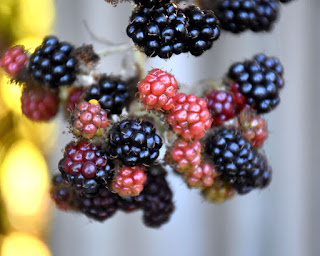
I took this picture in my backyard and sort of had to the eyelevel of the berries to take the picture.The setting was on program mode with a normal shutter and aperture. After I took it I took it to photoshoot to auto adjust the tone, color, and contrast. I like the picture because it is very colorful and clear. I would've changed the aperture a little for it to be focused on a berry or 2.

Pumpkin

Image
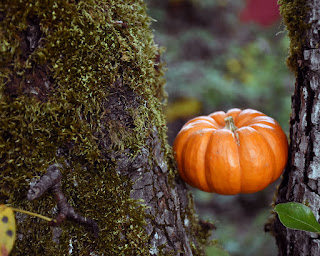
I also took this picture in my backyard ,I set up a little pumpkin I have in between a tree and set the camera in camera mode with a normal shutter speed and aperture. I zoomed in so it would be more clear overall. I took this to Photoshop to make it clearer and more attractive to the eye.I adjusted the levels and the colors to have it poo out more.I like this picture very much because it reminds me of fall and the colors. i would've zoomed in more closer for it to be focused on the pumpkin more.